 Knowledge Library
Decision in brief
Use Tailscale when you want identity-controlled access between known devices or to a limited private subnet and prefer a managed coordination service. Start by installing it on the endpoint that needs access. Add a subnet router only for devices that cannot run the client, and add an exit node only when you need its internet egress.
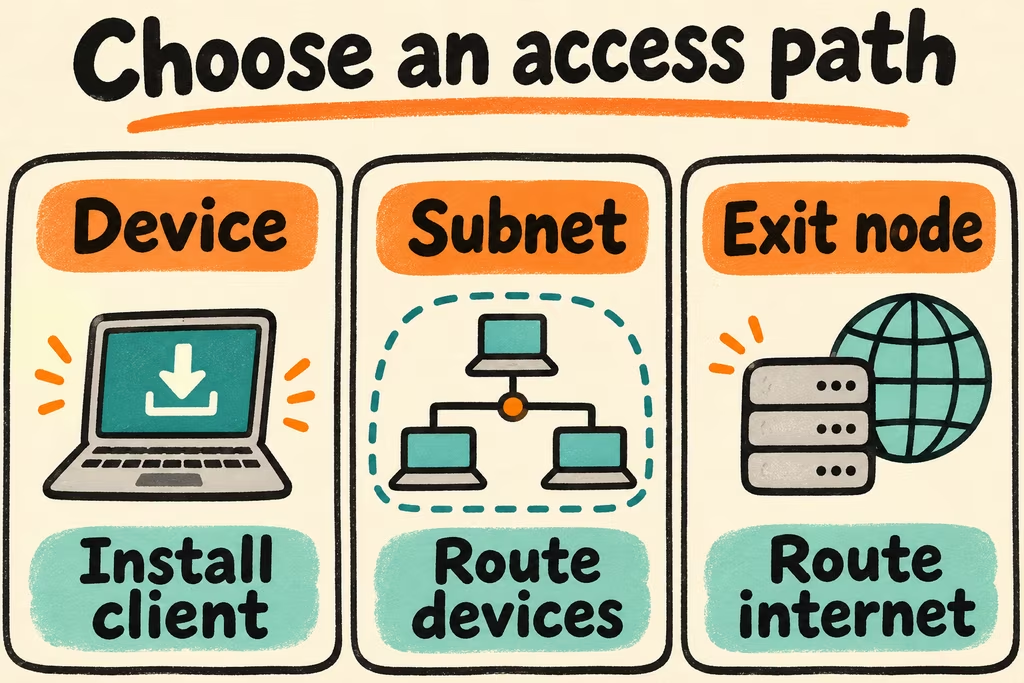
Pick the connection you actually need
Devices in a Tailscale network can connect directly when the network path permits it. Some connections are relayed. Measure file transfer and interactive use from the network you will actually travel on, especially when direct connectivity matters.
Review the existing policy before adding devices. Use narrowly scoped grants and verify both a permitted test device and a test device that should be denied. Already-established connections can behave differently from new sessions during a coordination outage. On 16 November 2026, Tailscale’s pricing page listed Personal at $0 for up to six users, Standard at $8 per user per month and Premium at $18 per user per month. Check the live matrix for tagged resources, policy groups, and business features before buying.
| Goal | Choose | Verify |
|---|---|---|
| Connect to one workstation or service | Install Tailscale on that device and the client | The client can reach the intended service and no adjacent services |
| Reach a NAS or appliance without an agent | Advertise the smallest required private subnet from a subnet router | Access is limited to the needed host or service and local subnets do not collide |
| Use a trusted home or office internet connection away from it | Opt in to an exit node | Ordinary internet access uses the chosen egress and works acceptably on mobile |
| Depend on it for emergency administration | Keep an independent authorized recovery path | A second operator can reach a recovery console without the overlay |
Two HN reports to design around
In the Tailscale Down thread, tapppi reported losing the device listing and then access through tailnet IPs while changing local DNS. That is one observed outage experience. Write down the difference between an application outage, a DNS issue and a connection issue before onboarding a service that matters.
In the performance thread, miki123211 described segmented networks where peers could each reach an intermediate device while direct traversal between the endpoints failed. Measure paths and throughput across each intended network pair before relying on the overlay for large file transfers.
Run a two-device reachability and recovery trial
Use your own test devices and a low-impact staging service. Agree on minimum throughput, reconnection time and what should remain unreachable.
- Register two test devices and grant access only to the staging service. Connect once from the home network and again from a phone hotspot or the intended remote network.
- Record connection type and throughput using a non-sensitive file. Check access from an authorized account and from a test identity that should be denied by policy.
- Disconnect the overlay on a test device, confirm an independent authorized administration path and verify that removing a staging device revokes its access.
- Keep the setup if documented routes, performance, membership changes and recovery pass. Stop if testing requires broader access than the service needs or there is no working recovery path.